My Geocaching Profile.com analyzes your geocaching finds and creates a personalized
profile that displays your geocaching statistics, charts, and maps. In addition
to calculating basic statistics like find counts, difficulty/terrain averages, and
breakdowns of cache types and container types, the site can also show your first
to finds, United States county and state maps, and progress on various challenges
like the DeLorme, Fizzy, and Jasmer challenges. You'll even be rewarded special
badges for stellar geocaching achievements.
You can enjoy your profile on the site or set your geocaching.com account to display
this profile so other cachers can see your accomplishments. Check out our
profile for an example of what the site can do.
First off before you begin, you need to be a Premium member of geocaching.com to
use this service. Only Premium members can download the special "My Finds" pocket
query that is needed to create a profile on this site. Sign up for a Premium membership
at
geocaching.com.
Creating a MyGeocachingProfile.com Account
Before you can upload your finds and start customizing your profile, create a My
Geocaching Profile.com account. Mygeocachingprofile.com is run independently of
geocaching.com so your geocaching.com username/password does not automatically work.
You can of course create an account using the same username as your geocaching.com
account if you wish. The account is free and you can delete it at any time -
Create An Account Now!
Getting Your "My Finds" Pocket Query File From Geocaching.com
Everytime you want to update your statistics, charts, and maps with your new cache finds, you'll need to download a
new My Finds pocket query from geocaching.com. Go to the
geocaching.com "Your Pocket Queries" page,
make sure the "Active Pocket Queries" tab is selected, scroll down to the "My Finds" section, and click on the "Add to Queue"
button. A new My Finds pocket query will be generated and geocaching.com will notify you via email when it is ready to download.
Note that you cannot use pocket queries that you create/customize yourself on geocaching.com or other sites.
Only this special "My Finds" pocket query ZIP file will work. Other files will give you an error if you try to upload them.
The My Finds pocket query can only be downloaded once every three days.
Uploading Your "My Finds" Pocket Query to MyGeocachingProfile.com
Whenever you want to update your statistics, charts, and maps with your new finds,
you need to upload your latest "My Finds" pocket query zip file. To upload the file,
go to the
Update Stats page.
Select the "Choose File" button and browse for the My Finds pocket query zip file
on your computer. After selecting the file, click the "Upload" button. You'll need
to wait for your web browser to upload the file. Uploads can take anywhere from
a few seconds to several minutes depending on the size of your file and your Internet
connection speed. Once the file is uploaded, the website will begin to process your
data. A green bar will advance to show you the progress. Again, depending on how
many caches you've found, this process can take anywhere from several seconds to
a half hour. It's OK to close the web browser or even turn off your computer if
you need to. The processing is already taking place on our servers so it will continue
no matter what.
Note: If you've already copied HTML for your profile to the geocaching.com site,
then you're finished. Your profile on geocaching.com will automatically be updated!
Once your finds have been fully analyzed by the site you can go to the
Customize Profile page to look at each profile section and customize your
settings. There are lot of different settings and options connected to each profile
section. For example, you can manually enter your lab cache finds and FTFs, change
the interval used for generating your milestone list, indicate DeLorme pages for
which you've been granted special credit, and much more. Your changes will be reflected
in your profile the next time you upload your "My Finds" pocket query. Note that
at the top of the page there are three links for "Statistics/Charts," "US Maps,"
and "Other Maps" that allow you to navigate between these different profile sections.
The Customize Profile page also lets you uncheck profile sections that you don't
want to include in your final profile. These sections will always be available on
the Customize Profile page, but will be left out of the HTML code for your final
profile on the Preview and Export Profile page.
Previewing Your Profile and Exporting It To Geocaching.com
The
Export Profile page allows
you to preview your complete profile showing only the sections you've checked on
the Customize Profile page. It also produces the HTML code that you need to display
your profile anywhere else on the web. You can add this code to your geocaching.com
profile or a personal website. When you upload new My Finds pocket queries, your
profile images will automatically update here and on your geocaching.com profile
page.
To display your profile on the geocaching.com profile page, highlight all of the
HTML code and copy it using CTRL+C. Then go to the
Account Settings Profile Information page and paste the
code into the About field. When finished, click the "Save Changes" button.
Everytime you want to update your statistics, charts, and maps with your new cache
finds, you'll need to download a new My Finds pocket query from geocaching.com and
upload it to mygeocachingprofile.com. You won't need to re-copy your HTML code to
geocaching.com. The images displaying your profile will automatically update. You'll
only need to re-copy the HTML code if you want to entirely add or remove a profile
section.
Information About Profile Sections
Most of the profile sections are self-explanatory, but some are generated based
on the specific rules of challenges. This section outlines these rules.
Traveling (Moving) Caches
Location-based sections like My Caching Radius and maps exclude any moving or traveling
caches that you've found. Moving caches change location with each new finder. The
finder takes the cache with them, rehides it and updates the coordinates on the
cache homepage. These caches don't have a unique type on geocaching.com, but the
cache page usually explains their behavior. Since you might have found a moving
cache in your hometown and now it's half way across the world, these caches shouldn't
be factored into your location-based stats. Please see our
bookmark list of moving caches to find out which are excluded.
US, World, and Country Map Sources
The "My AL DeLorme Progress" section is based on the challenge described in the
"GCTTNW - Alabama DeLorme Challenge" cache. Our calculations
take into account the requirements outlined in this cache description including
the rules that:
- The challenge excludes all event, CITOs, and locationless caches.
The "My AR DeLorme Progress" section is based on the challenge described in the
"GC14TRP - DeLorme" cache. Our calculations take into account
the requirements outlined in this cache description including the rules that:
- All caches must be caches with a container and a logbook. Virtuals, locationless,
webcams, events, etc. will not count.
The "My AZ DeLorme Progress" section is based on the challenge described in the
"GC1AHJN - Arizona DeLorme Challenge" cache. Our calculations
take into account the requirements outlined in this cache description including
the rules that:
- All cache types count as finds for the DeLorme Challenge with the exception of events
(CITO included) and locationless caches.
- The following pages are exempt: Pages 19, 20, 21, 27, 28, and 29. These pages are
wholly Indian Reservation lands where caching is generally not allowed. Update:
Due to some confusion, we're adding the eastern block of page 64 to the exempt list.
You will still need a cache from the west block of page 64.
The "My CA DeLorme Progress" section is based on the challenge described in the
"GC1M0M0 - Golden State DeLorme Challenge" cache. Our calculations
take into account the requirements outlined in this cache description including
the rules that:
- The only caches that count are Traditional, Virtual, Webcam, Letterbox, and Earthcaches.
Event/CITO caches (including GPS Adventures Maze Exhibits), Locationless, Multi,
Whereigo & Mystery/Puzzle caches do NOT count.
- If a page covers two different areas (such as Pg 69, 99 & 148) you only need to
find ONE cache per page. Exception being Pg 139 which includes Catalina Island –
you MUST find a cache on the mainland AND Catalina Island.
- Pages 136 and 137 are exempt and are therefore awarded automatically.
My CA DeLorme Progress (Northern)
The "My CA DeLorme Progress (Northern)" section is based on the challenge described
in the
"GCHANH - California DeLorme Challenge (Northern)" cache.
Our calculations take into account the requirements outlined in this cache description
including the rules that:
- You must find or place a cache within each PAGE of the California Northern DeLorme
Map (not necessarily each page subsection)
My CA DeLorme Progress (Southern/Central)
The "My CA DeLorme Progress (Southern/Central)" section is based on the challenge
described in the
"GC18M1N - California DeLorme Challenge (Southern & Central)"
cache. Our calculations take into account the requirements outlined in this cache
description including the rules that:
- All cache types count as finds or hides for the DeLorme Challenge with the exception
of events (CITO included) and locationless caches.
- Pages 54 and 120 are exempt and hence automatically awarded.
The "My CO DeLorme Progress" section is based on the challenge described in the
"GCWXFK - Colorado DeLorme Challenge" cache. Our calculations take into
account the requirements outlined in this cache description including the rules
that:
- All cache types count as finds for the DeLorme Challenge.
- Pages 102 and 103 contain two maps on each page. You must find a cache for each
of these maps.
The "My CT DeLorme Progress" section is based on the challenge described in the
"GCXEGV - Connecticut Delorme Challenge" cache. Our calculations
take into account the requirements outlined in this cache description including
the rules that:
- All cache types (including Earth caches and existing Virtual caches) count as finds
or hides for the Connecticut DeLorme Challenge; with the exception of Events (CITO
included) and Locationless caches these WILL NOT be allowed.
- You must find or place a cache within each grid of the “Connecticut Rhode Island
Atlas & Gazetteer” page one, published by DeLorme. Forty (40) grids in all.
The "My DE DeLorme Progress" section is based on the challenge described in the
"GC21XB6 - Delaware DeLorme Challenge" cache. Our calculations
take into account the requirements outlined in this cache description including
the rules that:
- This cache requires finding a geocache in Delaware for each of the 14 Delorme pages
that contain Delaware territory. There are 7 pages that cover just Delaware and
7 pages that have both Delaware and Maryland territory.
- All cache types count as finds or hides for the DeLorme Challenge with the exception
of Locationless (RIP), Event and CITO caches.
- A cache in either of the two maps on page 62 (excluding caches that fall outside
of Delaware) will satisfy that page.
The "My FL DeLorme Progress" section is based on the challenge described in the
"GC5702R - Florida Delorme Challenge" cache. Our calculations take into
account the requirements outlined in this cache description including the rules
that:
- All cache finds past, present, and future will be allowed to count toward page qualification.
- All cache types will be allowed to count toward page qualification, with the exception
of locationless, CITO, and event caches.
- For Delorme pages that contain multiple parts
a find in either portion of the page will count toward both.
- In earlier editions, DeLorme pages 120 & 126 are exempted from this challenge due to their unique nature
and accessibility.
The "My GA DeLorme Progress" section is based on the challenge described in the
"GCZ8XQ - Georgia DeLorme Challenge" cache. Our calculations
take into account the requirements outlined in this cache description including
the rules that:
- Only caches with physical containers and logbooks will count in the Georgia DeLorme
Challenge. The listed coordinates on the cache page will be the coordinates used
in determining the page that the cache counts toward. The final stage of multi-caches,
mystery caches, and letterbox hybrids must also fall on the same page as the listed
coordinates. This guideline is based on the honor system.
- On pages consisting of multiple map blocks a cache must be found for each block,
not just one for the page. A total of 63 cache finds will be required to complete
the Georgia Challenge.
The "My IA DeLorme Progress" section is based on the challenge described in the
"GC10ND9 - Iowa DeLorme Challenge" cache. Our calculations
take into account the requirements outlined in this cache description including
the rules that:
- There is only one inset in the Iowa edition of the DeLorme Atlas. It is on page
55. It shows Clinton and the far east tip of Iowa on the same page as the quad cities.
A find in either area for be considered a find for that page.
- You may either do the challenge as "TrailBlazer" or as "Heritage." Heritage means
you may include caches found prior to the creation of the Iowa Challenge, as long
as they meet all other Challenge requirements. TrailBlazer means you will only include
caches found since the creation of the Iowa Challenge (that would be on or after
January 29th, 2007.)
- The caches must be physical caches with a container and a logbook (no virtuals,
locationless, webcam, event caches, etc.) that you have personally found and logged.
The "My ID DeLorme Progress" section is based on the challenge described in the
"GCQVXZ - IDAHO'S DeLORME CHALLENGE" cache. Our calculations
take into account the requirements outlined in this cache description including
the rules that:
- All cache types count as finds or hides for the DeLorme Challenge with the exception
of events (CITO included) and locationless caches.
- A cache must be found on each of the 52 sections of the DeLorme map.
The "My IL DeLorme Progress" section is based on the challenge described in the
"GCREG1 - The Illinois DeLorme Challenge" cache. Our calculations
take into account the requirements outlined in this cache description including
the rules that:
- All cache types count as finds or hides for the DeLorme Challenge with the exception
of events (CITO included) and locationless caches.
The "My IN DeLorme Progress" section is based on the challenge described in the
"GC14PRK - Indiana Delorme Challenge" cache. Our calculations
take into account the requirements outlined in this cache description including
the rules that:
- All cache types count as finds or hides for the DeLorme Challenge with the exception
of events (CITO included) and locationless caches.
- There are two caches right on the border of page 54. As of the placement date, GCXWDK
(1875) and GCXWE4 (The Depot) will count towards page 54 even though they lay just
over the blue line that frames each map page.
- Page 59 has an inset map, so includes two separate areas of Clark and Switzerland
counties. A find in either area will count for page 59.
The "My KY DeLorme Progress" section is based on the challenge described in the
"GC177MT - Kentucky DeLorme Challenge" cache. Our calculations
take into account the requirements outlined in this cache description including
the rules that:
- In order to start with a "level playing field" for everyone, only finds on or after
January 1, 2008 will be eligible.
- All cache types count as finds for the DeLorme Challenge with the exception of events
(CITO included), locationless caches, temporary event caches and grandfathered "moving
caches".
- Pages 32, 33, 73 and 88 each contain 2 map segments. A find in either segment on
the page will fulfill the requirement for that page.
The "My LA DeLorme Progress" section is based on the challenge described in the
"GCWXQW - Louisiana Delorme Challenge" cache. Our calculations
take into account the requirements outlined in this cache description including
the rules that:
- Event, CITO, and locationless type caches will not be allowed. All other cache types
(unless otherwise noted) will be counted.
- Maps 49, 59,and 60 would require boats in order to hide/seek caches. These 3 maps
will not be required in order to complete this challenge.
- On applicable maps that have split views (map 31), a cache must be found/hid on
both views.
The "My MA DeLorme Progress" section is based on the challenge described in the
"GCYJY1 - Massachusetts DeLorme Challenge" cache. Our calculations
take into account the requirements outlined in this cache description including
the rules that:
- You may not include caches found by you prior to the publication date and time of
this cache page as determined by the reviewer's note of publication. This date is
10/4/2006.
- Note that pages 31, 43, 60 and 62 have split maps. You need only find one cache
on each of those pages, it does mater which section it is in.
- All active physical cache types (including Earth caches and Letterbox Hybrid caches)
count as finds or hides for the Massachusetts DeLorme Challenge. Events (CITO included),
Virtuals, Locationless and Traveling caches WILL NOT be allowed. For Multis and
Mysteries, the posted coordinates determine which page the cache counts on for finds
and where the final is located for hides.
My MD/DE DeLorme Progress
The "My MD/DE DeLorme Progress" section is based on the challenge described in the
"GCR7CH - The Maryland and Delaware DeLorme Challenge" cache. Our calculations
take into account the requirements outlined in this cache description including
the rules that:
- All cache types count as finds or hides for the DeLorme Challenge with the exception
of Locationless (RIP), Event and CITO caches.
- The three map pages of 54, 62 and 65 count as one excluding caches that fall outside
of Maryland and Delaware. (Virginia, New Jersey and Pennsylvania). To further clarify,
on map pages 54, 62 and 65, a cache in either of the two maps on that page (excluding
caches that fall outside of Maryland and Delaware) will satisfy that page.
The "My ME DeLorme Progress" section is based on the challenge described in the
"GCW8N6 - Maine's DeLorme Challenge" cache. Our calculations take into account
the requirements outlined in this cache description including the rules that:
- All cache types (including Earth caches and existing Virtual caches) count as finds
or hides for the Maine DeLorme Challenge; with the exception of Events (CITO included)
and Locationless caches. They will NOT be allowed
- EXEMPT PAGES...I have decided to continue the exemption for the following pages;
54, 60, 61, 62, and 70. Even though there are caches on a few of these map pages,
they are remote and the areas are hard to navigate to and may even require entering
into Canada.
The "My MI DeLorme Progress - Version 14" section is based on the Michigan DeLorme
atlas Edition 14. As of now, the current DeLorme challenge described in
"GC1EBKT - Michigan's DeLORME Challenge" requires an older
Edition 12 or 13 map. We'll work to track down an older edition so we can provide
an Edition 12 or 13 profile section.
- All cache types except event and locationless meet the qualifications for this challenge.
- There are some pages that have 2 maps. You may find one cache on either map.
The "My MN DeLorme Progress" section is based on the challenge described in the
"GCTVMK - The DeLorme Challenge -- Minnesota Style" cache. Our calculations
take into account the requirements outlined in this cache description including
the rules that:
- All cache types count as finds or hides for The DeLorme Challenge -- Minnesota Style
with the exception of events (CITO included) and locationless caches.
- For pages with multiple sections, you can find a cache in either section to get
credit for the page.
The "My MS DeLorme Progress" section is based on the challenge described in the
"GCTA92 - Mississippi DeLorme Challenge" cache. Our calculations
take into account the requirements outlined in this cache description including
the rules that:
- All cache types count as finds or hides for the DeLorme Challenge.
- Caches on the sub-pages do not have to be found, only the main pages, however, a
cache on the sub-page will count towards the page it is a sub-page of.
- You may include caches found or hidden prior to the creation of The Mississippi
DeLorme Challenge, but not before October 29, 2003.
The "My MT DeLorme Progress" section is based on the challenge described in the
"GC12727 - The Montana DeLorme Challenge" cache. Our calculations
take into account the requirements outlined in this cache description including
the rules that:
- All cache types count as finds or hides for the DeLorme Challenge with the exception
of events (CITO included) and locationless caches.
- On pages consisting of multiple blocks a find must be logged in each block, not
just one for the page. This occurs on page 52 in the Montana Atlas. Page 36 also
has two blocks, but only one contains land in Montana.
The "My NC DeLorme Progress" section is based on the challenge described in the
"GCTYE6 - The North Carolina DeLorme Challenge" cache. Since
edition 8 of the NC DeLorme map differs from editions 1-7, we calculate your progress
on both maps. Our calculations also take into account the requirements outlined
in this cache description including the rules that:
- For editions 1 - 7, a cache must be found in both map blocks of pages #30, #70,
and #71 to receive credit. We give half credit for each map block which is why your
profile might say you have .5 of a page.
- For edition 8, a cache must be found in both map blocks of pages #29, and #86.
- All cache types count as finds with the exception of events (regular, Mega and CITO)
and locationless caches.
The "My ND DeLorme Progress" section is based on the challenge described in the
"GC1D5D3 - The North Dakota DeLorme Challenge" cache. Our
calculations take into account the requirements outlined in this cache description
including the rules that:
- All cache types, with the exception of events, CITO and locationless caches will
count as finds for this DeLorme Challenge. Temporary event caches and "moving caches"
will not count as finds.
The "My NE DeLorme Progress" section is based on the challenge described in the
"GCR57E - Nebraska Delorme Challenge" cache. The cache description outlines
two versions of the challenge: a Fresh Start challenge and a Retroactive challenge.
We track your progress on each challenge separately with two maps. Our calculations
also take into account the requirements outlined in this cache description including
the rules that:
- For the Retroactive level you may count every cache you have ever found or placed.
For the Fresh Start level count only caches found or placed after October 31,2005,
the date this cache was published.
- All caches must be caches with a container and a logbook. Virtuals,locationless,
webcams, events, will not count.
- Page 68 has two separate maps for sections of Nebraska at opposite ends of the state:
the Nebraska City/Plattsmouth strip in the east and the far southwest corner of
the state in Dundy and Chase Counties. You must log a cache in the eastern Nebraska
section shown at the left of the page but I decided to allow the western Nebraska
portion, at the right of the page, to be treated as part of page 69.
- Page 56 has three strip maps for adjacent areas along the southern edge of the panhandle.
You may consider these to be one map and log a cache in ANY of the three.
- The insert at the upper right of page 27 is considered a part of page 27.
The "My NH DeLorme Progress" section is based on the challenge described in the
"GCZTTQ - New Hampshire DeLorme Challenge" cache. Our calculations take
into account the requirements outlined in this cache description including the rules
that:
- The following cache types count as finds or hides for the NH DeLorme Challenge:
Traditional, Multi, Mystery, Letterbox, Hybrid, Virtual, Unknown, Webcam, Earthcache.
- Page 24 is basically in Vermont, with a small slice of water as the border. Therefore,
page 24 will not be required.
The "My NM DeLorme Progress" section is based on the challenge described in the
"GC20CTQ - New Mexico DeLorme Challenge" cache. Our calculations
take into account the requirements outlined in this cache description including
the rules that:
- You will need all four blocks of pages 56 and 57.
- All new and old caches count except for locationless, webcams, and events, and the
"Quadrants" series.
The "My NV DeLorme Progress" section is based on the challenge described in the
"GCQ51E - Nevada DeLorme Challenge" cache. Our calculations
take into account the requirements outlined in this cache description including
the rules that:
- You will be allowed to log Virtual caches as finds. Locationless caches, Event caches
and CITO caches will not be allowed. Multis and Puzzles, yes, but only if the initial
geocaching.com waypoint appears in Nevada (conceivably it could end in another state).
- Due to the layout of the Nevada DeLorme book quads 50 AND 42 overlap slightly. If a cache
is in that “shared space” between quads, a cacher my log it in one quad or the other,
not both. Of course a different cacher may choose to do the opposite.
The "My NJ DeLorme Progress" section is based on the challenge described in the
"GC16TDD - Tour de Cache 2 - NJ DeLorme Challenge" cache.
Our calculations take into account the requirements outlined in this cache description
including the rules that:
- Pages 66 and 73 each have two map sections. Find one cache in either section to
complete those pages.
- Caches found before the listing date of this cache, are not allowed for this challenge.
The list date is October 25, 2007.
- All cache types count as finds for the DeLorme Challenge with the exception of events
(CITO included), locationless caches and grandfathered "moving caches".
The "My NY DeLorme Progress" section is based on the challenge described in the
"GC102CP - New York's DeLorme Challenge" cache. Our calculations
take into account the requirements outlined in this cache description including
the rules that:
- Page #38 is a freebie since none of the page is in NY state
- A cache must be found in both map blocks of page #34 to receive credit. We give
half credit for each map block which is why your profile might say you have .5 of
a page.
- A cache must be found on or after January 1st, 2006 to be counted towards the challenge.
- A cache must be a physical cache to be counted (i.e., no virtuals, CITO, event caches,
web cams, or earthcaches allowed)
The "My OH DeLorme Progress" section is based on the challenge described in the
"GCZ554 - Ohio DeLorme Challenge" cache. Our calculations
take into account the requirements outlined in this cache description including
the rules that:
- A cache must be found on or after December 2nd, 2006 to be counted towards the challenge.
- To complete the Ohio challenge you have to find a cache in each of the sections
of the Ohio DeLorme book.
- Only physical and virtual caches from each block will count, no locationless or
event caches.
The "My OK DeLorme Progress" section is based on the challenge described in the
"GCTJYG - Oklahoma DeLorme Challenge" cache. Our calculations
take into account the requirements outlined in this cache description including
the rules that:
- Cito, Event and Locationless caches DO NOT COUNT
- Section 59 is divided into 59 and 59 inset. 58 is divided into 58, 58 inset 2and
58 inset 3. 58 inset 1 is NOT counted due to it's small size, mostly in the Red
River. You must find or hide a cache in each of these sections.
The "My OR DeLorme Progress" section is based on the challenge described in the
"GCQKKE - Oregon DeLorme Challenge" cache. Our calculations
take into account the requirements outlined in this cache description including
the rules that:
- To complete the Oregon challenge you have to find a cache in each of the sections
of the Oregon DeLorme book.
- Only regular and virtual caches from each block will count, no locationless or event
caches.
The "My PA DeLorme Progress" section is based on the challenge described in the
"GCXAE2 - The Pennsylvania DeLorme Challenge" cache. Our
calculations take into account the requirements outlined in this cache description
including the rules that:
- All cache types count as finds for the DeLorme Challenge with the exception of events
(CITO included) and locationless caches. Rule added 2/15/07: temporary event caches
and grandfathered "moving caches" are not eligible.
- Atlas page 41 is all in New York, and Atlas page 69 is all in New Jersey. You do
not need to find caches on these two pages.
- While the various editions and versions of the DeLorme Atlas do not seem to have
changed much in terms of page boundaries, the 2001 Edition will be considered definitive.
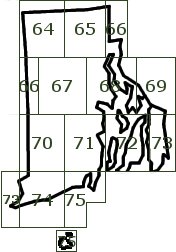
The "My RI DeLorme Progress" section is based on the challenge described in the
"GC5DCAA - Rhode Island Delorme Challenge" cache. Our calculations
take into account the requirements outlined in this cache description including
the rules that:
- This Challenge Cache requires that you find a cache on each of the 12 RI map pages.
Pages 66, 73, and 75 each have two map sections, but you only need to find a cache
in one of the sections on each of those pages.
- Only physical cache finds within RI count, that means Event, CITO, Virtual, Earth,
Locationless, and Lab caches are excluded. Only Traditionals, Multis, Puzzles, Letterbox
Hybrids and Wherigos are acceptable. The posted coordinates for a cache are used
when determining in which state or page a given cache falls, therefore, for puzzle,
multi, wherigo and letterbox hybrid caches use the published coordinates, not the
actual or final coordinates
- Because there was previously a DeLorme Challenge cache in Rhode Island, Groundspeak
requires that any cacher that found that Challenge cache to use a different set
of caches to log this cache. That means that if you logged a find on the archived
version of the RI DeLorme, then you will need to have at least two finds per page
to log this one. You will need to provide proof for both. For those of you who began
the previous challenge, or finished it but never logged the final, then you will
only have to provide proof of one cache per page.
The "My SC DeLorme Progress" section is based on the challenge described in the
"GCVG6Y - South Carolina DeLorme Challenge" cache. Our calculations take
into account the requirements outlined in this cache description including the rules
that:
- All cache types count as finds or hides for the DeLorme Challenge with the exception
of events (CITO included) and locationless caches.
- You may include caches found or hidden prior to the creation of the South Carolina
DeLorme Challenge so long as they meet all other Challenge requirements.
- The final cache coordinates can be obtained by successfully finding or having hidden
a cache in each page of the Atlas. South Carolina has 48 such pages.
The "My SD DeLorme Progress" section is based on the challenge described in the
"GCYTX1 - South Dakota DeLorme Challenge" cache. Our calculations
take into account the requirements outlined in this cache description including
the rules that:
- There are two versions of the challenge: "Retroactive" includes finds and hides
prior to the publication of the cache (9/22/06); "Brand New" starts the challenge
with only finds and hides after the publication of the cache (9/22/06).
- All cache types count as finds with the exception of the following: any type of
event, CITO, webcam, virtual, or locationless cache.
- Page 62 is comprised entirely of Native American Land but contains a virtual cache
within that area. In order to complete this challenge, you must log this virtual.
See the cache page for additional details.
- It is not necessary to complete a cache for the insert on page 68.
The "My TN DeLorme Progress" section is based on the challenge described in the
"GCZ313 - Tennessee DeLorme Challenge " cache. Our calculations take into
account the requirements outlined in this cache description including the rules
that:
- Only caches with physical containers and logbooks will count in the Tennessee DeLorme
Challenge.
- The listed coordinates on each cache page must be the coordinates for the actual
and final location. The listed coordinates on the cache page will be the coordinates
in determining where the cache is placed and what page it falls on.
- On pages consisting of multiple blocks a cache must be found for each block, not
just one for the page.
The "My TX DeLorme Progress" section is based on the challenge described in the
"GC2WBQZ - Lone Star state DeLorme Challenge" cache. Our
calculations take into account the requirements outlined in this cache description
including the rules that:
- There are some pages that have two different areas and you are only required to
find one on those pages not one in each area.
- Previous finds will count. You cannot use CITO, Events, or Webcams towards this challenge.
The "My UT DeLorme Progress" section is based on the challenge described in the
"GCYXXZ - Utah DeLorme Challenge"
cache. Our calculations take into account the requirements outlined in this cache
description including the rules that:
- Only caches found after the creation of the Utah DeLorme Challenge apply (found
on or after 11/01/2006)
- All cache placements must be bigger than film canisters. No micros.
- All cache types count as finds for the DeLorme Challenge with the exception of events
(CITO included), webcam, and locationless caches.
- While the various editions and versions of the Utah DeLorme Atlas has changed in
terms of page boundaries, I will leave it up to you to use the Delorme Atlas you
want to use, just as long as you find a cache on every page.
The "My VA DeLorme Progress" section is based on the challenge described in the
"GCVYD4 - The Virginia DeLorme Challenge" cache. Our calculations
take into account the requirements outlined in this cache description including
the rules that:
- All cache types count as finds or hides for the DeLorme Challenge with the exception
of Locationless, Event and CITO caches.
- The seven pages that are split between two maps (37, 40, 52, 63, 64, 71 and 78)
count as one cache per page, not one per map, excluding caches that fall outside
of Virginia.
The "My VT DeLorme Progress" section is based on the challenge described in the
"GC106PP - VERMONT DeLorme Challenge" cache. Our calculations
take into account the requirements outlined in this cache description including
the rules that:
- You need to find 37 caches in Vermont. One cache on each page (page 37 is a split
map and requires a find on both maps) to complete this challenge.
- You may NOT include caches found prior to the creation of The Vermont DeLorme Challenge.
Cache finds must be from the day this cache is posted onward (Jan. 5, 2007).
- CITO, meet and greets, and event caches do not count. It has to be a bona fide cache.
The "My WA DeLorme Progress" section is based on the challenge described in the
"GCQQ9B - Washington DeLorme Challenge" cache. Our calculations
take into account the requirements outlined in this cache description including
the rules that:
- You must find a cache on each and every block of each and every page of the Washington
State DeLorme Atlas & Gazetteer.
- All cache types count as finds or hides for the DeLorme Challenge with the exception
of events (CITO included) and locationless caches.
- Since the entire extent of Page 98 in the 2007 edition of the Washington DeLorme
Atlas lies within Oregon, it is not necessary to complete this page for the Challenge.
(Similarly, since Page 106 in the pre-2007 editions of the Atlas lies within British
Columbia, it is not necessary to complete this page for that version of the Challenge.)
The "My WI DeLorme Progress" section is based on the challenge described in the
"GC2C21G - The Wisconsin DeLORME Challenge Part Deux" cache.
Our calculations take into account the requirements outlined in this cache description
including the rules that:
- All finds must be physical caches with a container and a logbook (no virtuals, locationless,
webcam, event caches, etc.) that you have personally found and logged.
- All caches must be found by you AFTER the publication of this challenge (September
19, 2010).
The "My WV DeLorme Progress" section is based on the challenge described in the
"GCT147 - West Virginia DeLorme Challenge" cache. Our calculations
take into account the requirements outlined in this cache description including
the rules that:
- All cache types count as finds or hides for the DeLorme Challenge with the exception
of events (CITO included) and locationless caches.
- Pages 31 and 56 contain maps for two section of the state on the same page. For
these pages only, you must hide/find a cache on each section of those pages (total
of 4 not 2).
- As of the March 01, 2006 date listed above, there are no caches located on page
62. Consider pages 62 and 63 to be one and the same. Finding a cache on page 63
will also count for page 62.
The "My WY DeLorme Progress" section is based on the challenge described in the
"GC1A3RA - Wyoming Delorme Challenge" cache. Our calculations
take into account the requirements outlined in this cache description including
the rules that:
- You must find a cache on each and every block of each and every page of the Wyoming
State DeLorme Atlas & Gazetteer.
- All cache types count as finds for the DeLorme Challenge with the exception of locationless
caches.
MyGeocachingProfile.com has a few features that don't directly affect your profile
but are very useful as a geocacher.
My Well Rounded Cacher Challenge
The
Well Rounded Cacher Challenge feature shows the diversity and variety of caches you've found
from cache types, cache containers, cache sizes, difficulty/terrain ratings, etc. You can also
customize the challenge to restrict valid caches to specific states or time periods.
Follow the instructions on the page to specify what you're interested in seeing and then click the
Save Changes button. Then upload your pocket query file and return to the Well Rounded
Cacher Challenge page. At the bottom of the page, you'll see an image displaying
your progress. You can include the image in your profile by copying the provided
HTML to your geocaching.com profile. Or copy and send a link of the image to the
cache owner to show them your progress.
My AlphaNumeric Cacher Challenge
There are many "AlphaNumeric Cacher" challenges available that require the cacher
to find caches placed by 36 different cachers whose names start with each number
0 through 9 and each letter A through Z. The
My AlphaNumeric Cacher Challenge feature allows you to specify the exact
requirements of the cache you're working on and then generate an image showing your
progress.
Follow the instructions on the page to specify your challenge and then click the
Save Changes button. Then upload your pocket query file and return to the My AlphaNumeric
Cacher Challenge. At the bottom of the page, you'll see an image displaying your
progress. You can include the image in your profile by copying the provided HTML
to your geocaching.com profile. Or copy and send a link of the image to the cache
owner to show them your progress.
My AlphaNumeric Cache Name Challenge
There are many "AlphaNumeric Cache Name" challenges available that require the cacher
to find caches that have names starting with each number 0 through 9 and each letter
A through Z. The
My AlphaNumeric Cache
Name Challenge feature allows you to specify the exact requirements of the
cache you're working on and then generate an image showing your progress.
Follow the instructions on the page to specify your challenge and then click the
Save Changes button. Then upload your pocket query file and return to the My AlphaNumeric
Cache Name Challenge. At the bottom of the page, you'll see an image displaying
your progress. You can include the image in your profile by copying the provided
HTML to your geocaching.com profile. Or copy and send a link of the image to the
cache owner to show them your progress.
If you have a suggestion for an improvement or a new feature, please contact us
using our
Contact Us page.